Photo & video editor for iPhone

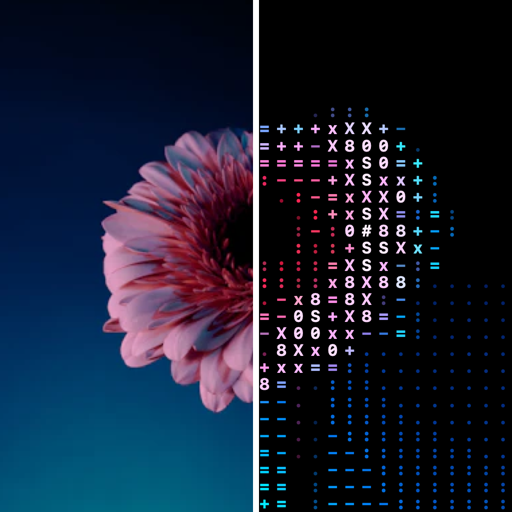
Turn any photo into living ASCII art.

Pick a photo, choose a style, add motion. Export a still, a looping video or a GIF in seconds.

Free to download. Every ASCII style is free. No account, no ads.

10ASCII styles, all free
82Pro effects
0photos uploaded, ever
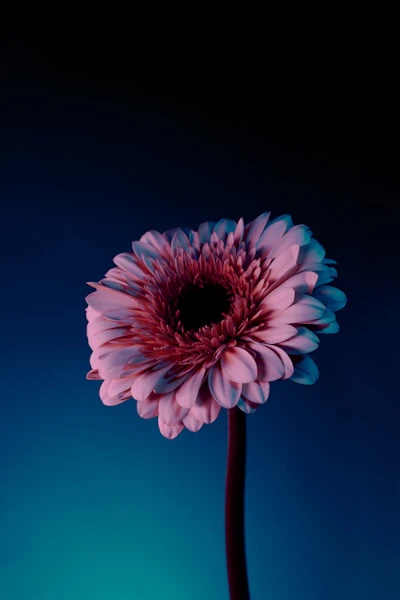
Original photo of a pink flower on a blue background BeforeAfter

How it works

Three taps from photo to art.

It works like the photo editors you already know: your photo on top, tools under your thumb.

  1. 01

    Pick a photo

    Choose from your library or take a new one. Not ready? Start with a sample.

  2. 02

    Choose a style

    Every style is previewed on your own photo, so you choose by looking, not guessing.

  3. 03

    Animate and export

    Add Ripple, Wave, Glitch or Rain, then save a photo, a looping MP4 or a GIF.

Styles

Ten ASCII styles, all free. 82 Pro effects.

Characters, dots, blocks, dither and more, with 17 character sets from classic @#S08 to Braille and Katakana. Everything below is rendered live, right here in your browser.

CharactersFreeGlyphs by brightness
DotsFreeHalftone circles
BlockFreeSolid color cells
DitherFree1-bit ordered dither
MixedFreeCharacters, blocks, dots
Pixel ArtFreeQuantized pixels
MosaicFreeDot sub-grid per cell
DiamondFreeRotated-square lattice
LinesFreeVertical line weight
DiagonalFree45° hatch, crosshatch

Animate

Bring any style to life.

Nine motions, every one free and every one a seamless loop. Pick a style and a motion: this is the editor's Animate tool, running in your browser.

Live

Style

Motion

1.00×
80%

In the app you also set randomness and loop length, then export a seamless MP4, GIF or Live Photo.

What's new

Now for video, with depth and your own characters.

The latest update brings ASCII to your clips and adds finer control to every edit.

Video → ASCII
0.0 s
New

Turn any video into ASCII

Every frame is redrawn in your style, live as you edit. Trim to the moment, keep the sound, and add motion or a Pro effect on top.

  • Trim with a frame strip, down to half a second
  • Plays with sound in the editor, even on silent
  • Audio copied into your MP4 export
  • Depth works frame by frame
◎

AI depth ♛ PRO

On-device depth adds parallax, fog and isolate, so your subject pops out of the art. Nothing is uploaded.

Aa

Your own characters

Type up to 16 characters. ASCII Studio measures each one and sorts them from dense to sparse.

◉

Live Photo export

Save an animation as a Live Photo that moves when you touch and hold it in Photos.

⧉

Copy and paste style

Touch and hold an edit to copy its look, then paste it onto another. Undo it anytime from History.

◭

Subject cutout ♛ PRO

Remove the background in one tap, so only your subject turns into art.

⌘

Keyboard on iPad

⌘E export, Space play, ⌘1–⌘6 tools, ⌘Z undo, ⌘Y history.

Made for creating

Edit like a pro. Without feeling like one.

~

Motion in one tap

Ripple, Wave, Scan, Glitch, Rain, Typewriter, Flicker and Breathe. Tune speed, intensity and loop length.

↶

Undo anything

Unlimited undo and redo, a full history you can jump back to, and edits that save themselves.

◧

Compare instantly

Hold to see your original photo, let go to see the art. Blend the two with the Strength slider.

▶

Video and GIF export

Seamless loops as MP4 or GIF, plus stills up to 4K. No watermark on free exports.

◐

Photo controls built in

Exposure, contrast, saturation, warmth and rotation, applied before the art is drawn.

⌂

Private by design

Everything runs on your iPhone or iPad. No uploads, no account, no tracking.

Advanced

Every control, when you want it.

The defaults look good on any photo. When you want more, it's one tap deeper. Start with the characters: pick a set or type your own.

Adjust › Characters
Classic
Blocks
Coded
Glyphs
Custom

Sorted by ink, dense to sparse: Pick Custom to try it

Intensity

Coverage
100%
Brightness
0
Contrast
100
Opacity
100%
Invert mapping
Off

Depth AI

Parallax
0–100
Fog
0–100
Isolate
0–100
Model
Depth Anything V2
Runs
On device

Color

Palette
Original · Mono · Terminal · Amber · Cyan · Paper · Sunset
Background
Black · Charcoal · White
Strength
0–100%

Photo

Light
Exposure · Contrast · Highlights · Shadows
Color
Saturation · Warmth
Detail
Sharpness · Vignette
Filters
12
Geometry
Crop · Rotate · Flip

Export

Still
PNG · JPEG · HEIC
Text
TXT · HTML
Motion
MP4 · GIF · Live Photo
Video sound
Kept
Watermark
None

History

Undo / redo
Unlimited
Jump to any step
⌘Y
Compare
Hold
Autosave
Always
Rendering
Metal GPU

ASCII Studio Pro

82 effects for when ASCII isn't enough.

Glass, distortion, paint and print, color, screen and glitch, pattern. Try every effect free on your own photo. You only need Pro to export.

Fluted GlassKaleidoscopeRisographHalftoneCRT ScreenDatamoshPixel SortTwirlDrosteThermalCyanotypeIce CrackleNeon GridLED MatrixOil PaintWatercolorAnaglyph 3DTopographyTruchetTilt-Shift

Pricing

Free to create. Pro when you want more.

Prices shown in US dollars. Your local price is shown in the App Store before you buy.

Free

$0

Forever. No trial, no catch.

  • All 10 ASCII styles and 17 character sets
  • Every animation and color palette
  • Photo, MP4 and GIF export, up to 4K
  • No watermark
  • Try all 82 Pro effects in the editor
Download free

FAQ

Questions, answered.

Is ASCII Studio really free?

Yes. Every ASCII style, animation, color palette and export (photo, video and GIF, up to 4K, no watermark) is free. Pro is optional and adds 82 photo effects.

Are my photos uploaded anywhere?

No. Everything is processed on your device. We don't have servers that receive your photos, and the app has no account or tracking. Read the Privacy Policy.

How does the free trial work?

The yearly plan starts with a 7-day free trial for people who haven't had one before. If you cancel at least 24 hours before it ends, you won't be charged. Otherwise the yearly subscription starts automatically.

How do I cancel?

On your iPhone, open Settings, tap your name, then Subscriptions, then ASCII Studio Pro. You keep Pro until the end of the period you paid for. Step-by-step guide

Can I use my creations commercially?

Yes. You own what you make. Just make sure you have the rights to the photos you start from.

Can I turn a video into ASCII?

Yes. Pick a video instead of a photo. You can trim it, add any style and motion, and export an MP4 with the original sound, or a GIF.

Which devices are supported?

iPhone and iPad with iOS or iPadOS 18 or later.

Your next photo deserves a remix.

Download ASCII Studio free and turn your camera roll into art in under a minute.

Download on the App Store